
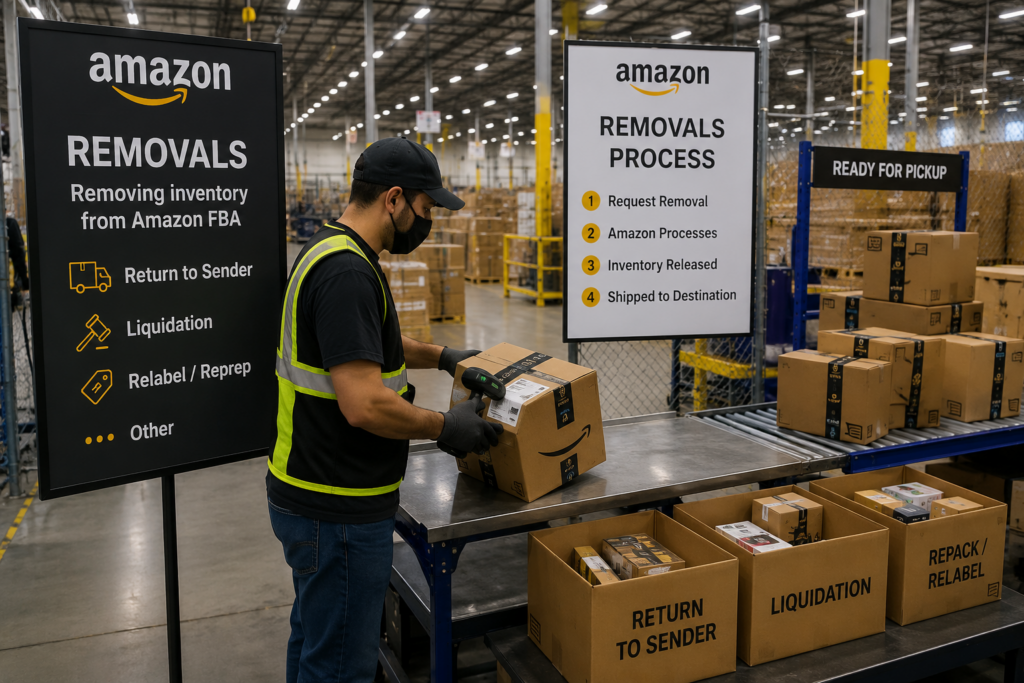
Amazon removal orders sound simple on paper. You request inventory back from Amazon, wait for it to leave the network, and decide what to do next.
In practice, the process is usually messier than that.
Removal inventory often arrives in batches, on different dates, with mixed conditions and incomplete visibility. Some units may need to be counted, relabeled, repacked, stored, reworked, or sent back into Amazon. That is why sellers often start looking for a removals warehouse before the first shipment even arrives.
If you are trying to understand how Amazon removal orders work, the main thing to know is this: the hard part often starts after the units leave Amazon.
What an Amazon removal order actually is
An Amazon removal order is a request to have inventory taken out of Amazon’s fulfillment network and sent elsewhere.
Sellers usually create removal orders when inventory is:
- aging or incurring storage pressure
- stranded or unsellable in its current state
- overstocked relative to demand
- being pulled back for relabeling, repacking, or review
- needed for another channel or a different fulfillment plan
The removal itself is only the transfer out of Amazon. It does not solve the next operational questions automatically.
Once the inventory starts arriving, someone still needs to receive it, track it, count it, verify it, and decide what happens next.
Why removal inventory gets complicated after it leaves Amazon
Many sellers assume removals will show up in one clean shipment with perfect visibility. That is not usually how it goes.
In practice, a more realistic picture looks like this:
- inventory can trickle in over time
- arrival dates may vary
- removal IDs need to be tracked
- unit counts may need manual verification
- products may need sorting, relabeling, or case work
- sellers often need a clear status view while they decide on the next move
That is why removal projects can become operationally heavy very quickly, especially if the seller is trying to manage them alone or does not have a warehouse prepared to receive them.
How the Amazon removal process usually works step by step
The exact flow depends on the seller’s situation, but a practical removal workflow usually looks like this.
1. The seller decides to pull inventory out of Amazon
This usually happens because storage costs are rising, inventory quality needs review, product labels need work, or the seller wants to redirect stock into another plan.
2. The seller creates or manages the removal request inside Amazon
At this stage, it becomes important to know where the inventory is going and who is prepared to receive it.
For ShipDepot’s documented process, removals support starts with permission to the client’s Amazon account so the team can help track the removal flow more accurately.
3. Inventory begins leaving Amazon
This is where expectations need to stay realistic. Inventory may not arrive as one neat project. It can land in multiple waves, which makes tracking and reconciliation important.
4. The receiving warehouse logs and verifies arrivals
Once removal inventory arrives, the warehouse should not just stack cartons and hope everything matches.
The process should include:
- checking removal identifiers where available
- receiving inventory into a tracking workflow
- counting and verifying what actually arrived
- separating units by condition or next action when needed
- flagging discrepancies or exceptions back to the seller
5. The seller decides what happens next
This is where removal projects often branch into different paths. Inventory may need to be:
- stored temporarily
- relabeled
- repacked
- prepped for shipment back into Amazon
- redirected into ecommerce fulfillment
- reviewed before any next step is chosen
That is why the best removals support is not just transport or storage. It is operational control after arrival.
What a removals warehouse should do after inventory arrives
Not every warehouse is a good fit for Amazon removals.
For sellers, the real question is whether the warehouse can handle inventory that may be messy, staggered, or decision-heavy.
A practical removals warehouse should be able to:
- receive inventory as it trickles in
- count and verify units instead of assuming carton labels are enough
- tag or organize inventory by removal project
- communicate clearly about what has arrived and what has not
- support next-step work such as rework, relabeling, case packing, or storage
ShipDepot’s removals support is built around this exact type of work: receiving removals as inventory arrives over time, counting and verifying units, tagging removal IDs, and providing visibility through shared tracking.
That kind of process matters because sellers usually need more than a place to drop inventory. They need clean visibility before they decide whether to rework, resell, restock, or hold it.
When Amazon removal orders turn into prep, storage, or rework projects
Removal orders often start as an inventory recovery issue and turn into a broader operations project.
Common examples include:
- units that need relabeling before they can go back into Amazon
- case pack changes before reshipment
- products that need to be sorted by sellable and non-sellable status
- stock that should move into another sales channel
- inventory that needs short-term storage while the seller decides what to do
This is one reason Amazon removals can lead naturally into other services, expanding into ongoing prep, returns, storage, or fulfillment work when the fit is right.
One anonymized example is especially relevant here: for one Amazon seller, ShipDepot received removal inventory that needed relabeling, case packing, rework, repacking, and shipment back into Amazon on a tight timeline. That should stay framed as project-specific proof, not a blanket promise, but it is a useful example of the kind of work removal orders can create.
How ShipDepot supports Amazon removals
ShipDepot is a strong fit for Amazon sellers who need hands-on help after inventory leaves Amazon.
Relevant positioning includes:
- 12+ years of Amazon operational experience
- hands-on removals and prep support
- count-and-verify receiving process
- barcode-driven workflows using UPC, FNSKU, and custom barcodes where applicable
- Extensiv WMS visibility
- Southern California / Palmdale warehouse operations
ShipDepot is not positioned as a generic storage-only stop. The stronger fit is sellers who need practical support receiving removals, organizing the inventory, getting clean visibility, and deciding what happens next.
If that is the situation, start with the Amazon Removals page, review the Case Studies / Proof Hub, and request a quote with enough detail about the inventory, timing, and next-step needs.
FAQ
What is an Amazon removal order?
An Amazon removal order is a request to have inventory taken out of Amazon’s fulfillment network and sent to another destination for storage, review, rework, resale, or another next step.
Do Amazon removal orders arrive all at once?
Not always. Removal inventory can arrive over time, which is why tracking, counting, and reconciliation matter.
What should happen when Amazon removal inventory arrives at a warehouse?
The warehouse should receive the inventory, track the project, count and verify units, flag discrepancies, and help organize the next step such as storage, relabeling, repacking, or reshipment.
Can Amazon removal inventory be sent back into Amazon?
In some cases, yes. Inventory may need relabeling, case work, rework, or verification first, depending on the condition and the seller’s plan.
When should a seller use an Amazon removals warehouse?
Sellers should consider a removals warehouse when inventory is arriving in multiple waves, needs manual counting or sorting, or may require storage, rework, prep, or visibility before the next decision is made.